> ## Documentation Index
> Fetch the complete documentation index at: https://docs.cutmeshort.com/llms.txt
> Use this file to discover all available pages before exploring further.
# Lead Track
> Understand deferred and non-deferred lead tracking with practical payload examples and implementation tips.
## What is a Lead Event?
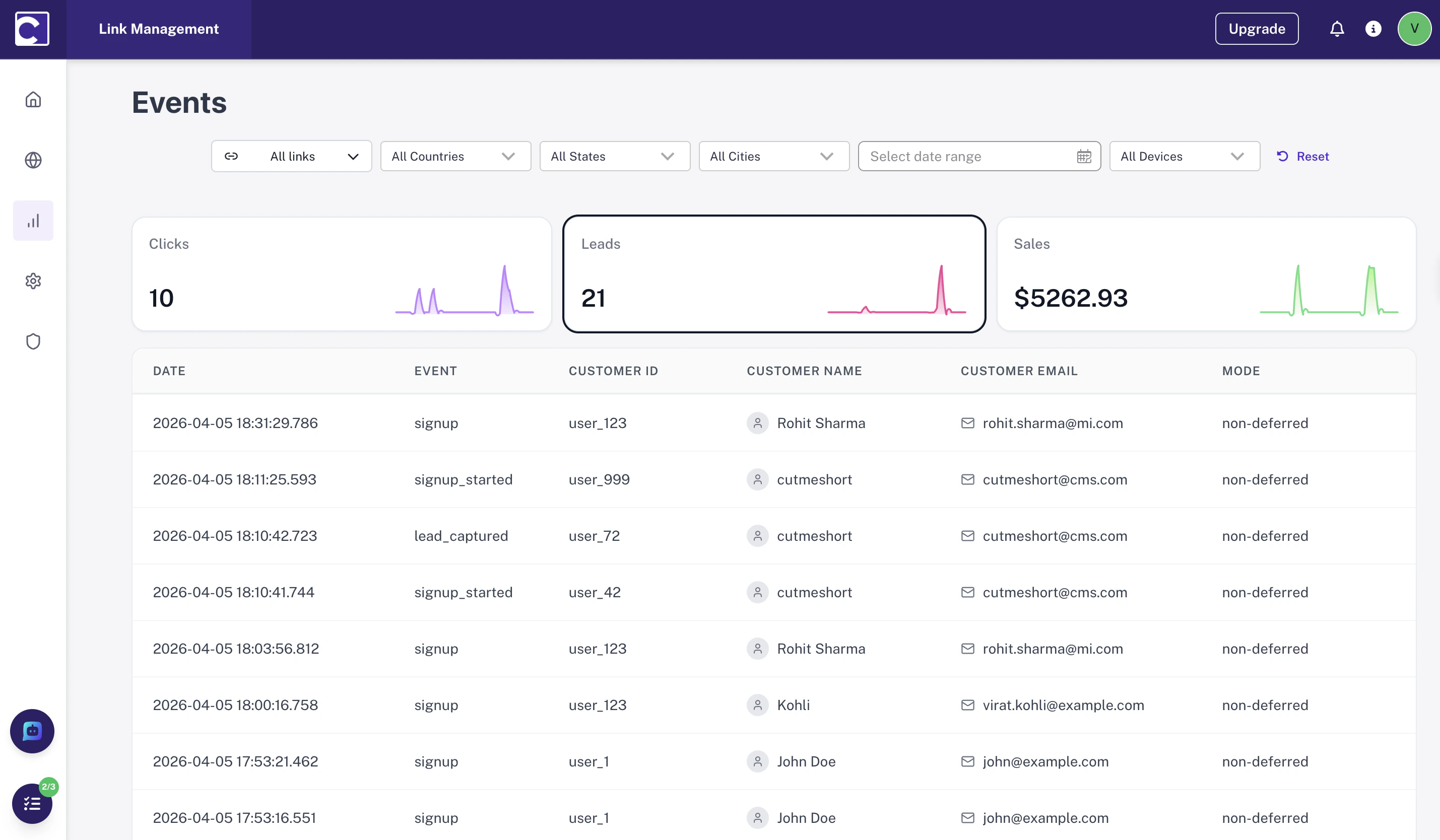
Lead events help you:
* **Attribute leads** to the correct source and campaign
* **Understand journey quality** across different traffic channels
* **Improve ROI reporting** by linking verified actions to ad spend
Common lead events include:
| Event | Description |
| -------------------- | -------------------------------------- |
| `signup_started` | User registers for an account |
| `onboarding_started` | User begins the onboarding flow |
| `demo_booked` | User schedules a product demo |
| `info_requested` | User submits a contact or inquiry form |
 ## Tracking Modes
There are two supported approaches. Choose based on whether your signup flow includes a verification step.
### Non-Deferred Tracking
Use this when you can **immediately trust** the lead action and no verification is needed.
* Send a **single event** right away
* Include `clickId` and `customerExternalId`
* Attribution is established immediately
### Deferred Tracking
Use this when **verification is required** before finalizing the lead (e.g., email or phone confirmation).
* Send **two events** — one before and one after verification
* Use `mode: "deferred"` on the first event
* Both events are linked via a shared `customerExternalId`
**When in doubt, use deferred tracking.** It's safer to hold a lead open until verified than to count unconfirmed signups as conversions.
## Tracking Modes
There are two supported approaches. Choose based on whether your signup flow includes a verification step.
### Non-Deferred Tracking
Use this when you can **immediately trust** the lead action and no verification is needed.
* Send a **single event** right away
* Include `clickId` and `customerExternalId`
* Attribution is established immediately
### Deferred Tracking
Use this when **verification is required** before finalizing the lead (e.g., email or phone confirmation).
* Send **two events** — one before and one after verification
* Use `mode: "deferred"` on the first event
* Both events are linked via a shared `customerExternalId`
**When in doubt, use deferred tracking.** It's safer to hold a lead open until verified than to count unconfirmed signups as conversions.
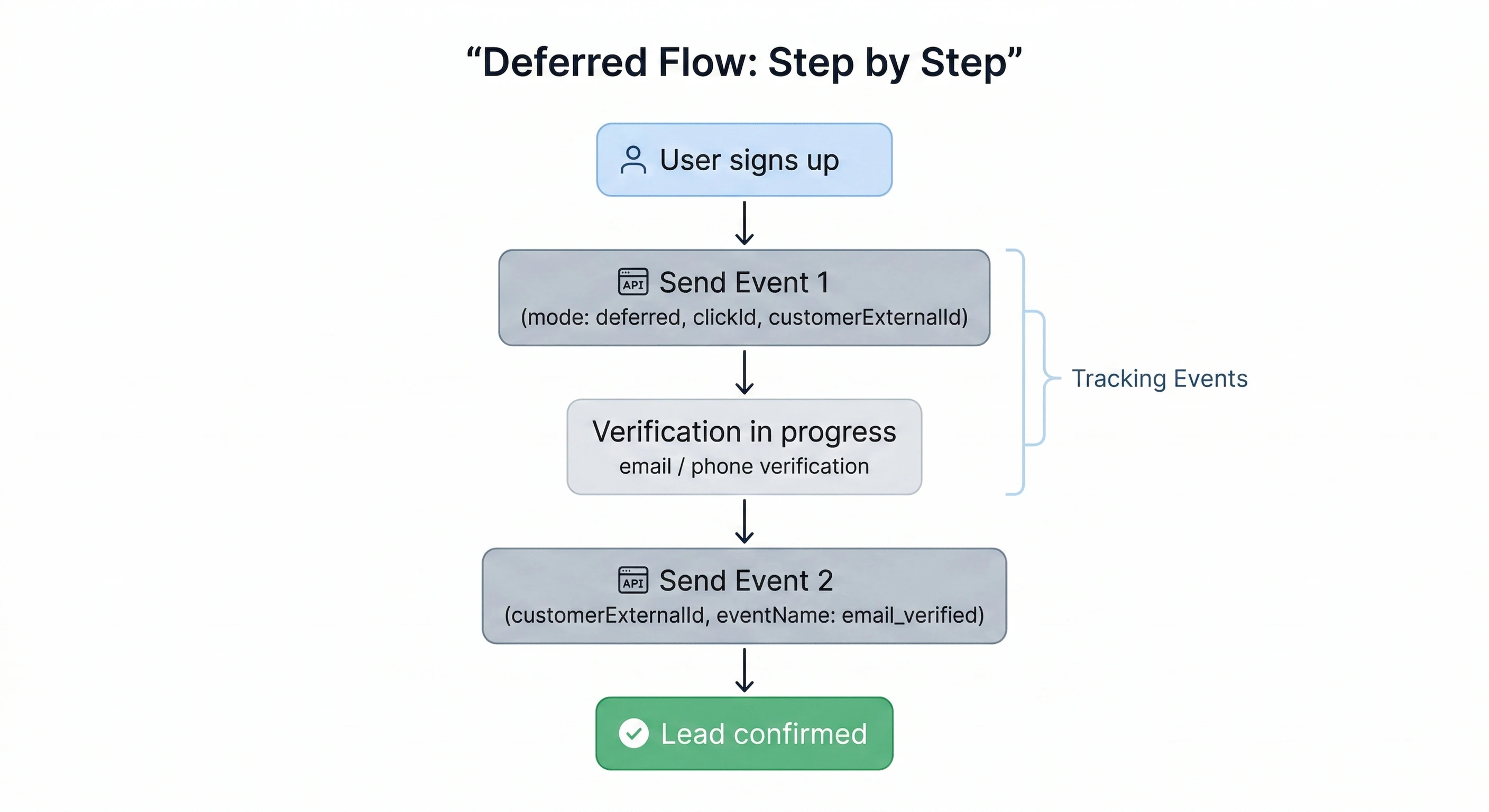 ### Event 1 - Before Verification
Send this immediately when the user initiates signup.
`clickId` is a unique identifier stored in cookies when our script detects `cms_rf` in the URL. See [article](/api-reference/endpoint/field) to know more.
**Required fields:**
* `clickId` — establishes attribution
* `mode: "deferred"` — marks this lead as pending
* `customerExternalId` — stable unique ID for the user
**Optional but recommended:**
* `customerName`, `customerEmail`, `customerAvatar` — enriches analytics
### Event 2 - After Verification
Send this once the user completes the verification step.
**Required fields:**
* `customerExternalId` — must match Event 1 exactly
* `eventName` — describes the verification action (e.g. `email_verified`)
**Do not include `clickId` in Event 2.** Sending it again will cause duplicate attribution errors. The second event only links back to the first via `customerExternalId`.
## Payloads
### Non-Deferred Lead
A single event when no verification step is required.
```json theme={null}
{
"clickId": "id_123",
"eventName": "signup_started",
"customerExternalId": "user_42",
"timestamp": "2024-01-15T10:30:00Z",
"customerName": "John Doe",
"customerEmail": "john@example.com"
}
```
### Deferred Lead — Event 1 (Before Verification)
Initiates deferred lead tracking. Attribution is locked to the `clickId` here.
```json theme={null}
{
"clickId": "id_123",
"mode": "deferred",
"eventName": "signup_started",
"customerExternalId": "user_42",
"timestamp": "2024-01-15T10:30:00Z",
"customerName": "John Doe",
"customerEmail": "john@example.com"
}
```
Add user details (`customerName`, `customerEmail`) in this first event. They will be attached to the lead even before verification completes.
### Deferred Lead Event 2 (After Verification)
Confirms the lead. Must use the same `customerExternalId` as Event 1.
```json theme={null}
{
"eventName": "email_verified",
"customerExternalId": "user_42"
}
```
The `customerExternalId` in Event 2 **must exactly match** the value sent in Event 1. Any mismatch will break the attribution chain and result in an unlinked lead.
## Fields
| Field | Required | Notes |
| -------------------- | ------------------ | -------------------------------------------------------------- |
| `clickId` | Yes (Event 1 only) | Establishes attribution. Never re-send in follow-up events. |
| `customerExternalId` | Yes (all events) | Must be stable and consistent across the full user journey. |
| `eventName` | Yes (all events) | Use descriptive names like `signup_started`, `email_verified`. |
| `mode` | Deferred only | Set to `"deferred"` on the first event of a deferred flow. |
| `timestamp` | Recommended | ISO 8601 format. Improves sequencing and debugging. |
| `customerName` | Optional | Enriches lead data in your analytics dashboard. |
| `customerEmail` | Optional | Enriches lead data in your analytics dashboard. |
### Event 1 - Before Verification
Send this immediately when the user initiates signup.
`clickId` is a unique identifier stored in cookies when our script detects `cms_rf` in the URL. See [article](/api-reference/endpoint/field) to know more.
**Required fields:**
* `clickId` — establishes attribution
* `mode: "deferred"` — marks this lead as pending
* `customerExternalId` — stable unique ID for the user
**Optional but recommended:**
* `customerName`, `customerEmail`, `customerAvatar` — enriches analytics
### Event 2 - After Verification
Send this once the user completes the verification step.
**Required fields:**
* `customerExternalId` — must match Event 1 exactly
* `eventName` — describes the verification action (e.g. `email_verified`)
**Do not include `clickId` in Event 2.** Sending it again will cause duplicate attribution errors. The second event only links back to the first via `customerExternalId`.
## Payloads
### Non-Deferred Lead
A single event when no verification step is required.
```json theme={null}
{
"clickId": "id_123",
"eventName": "signup_started",
"customerExternalId": "user_42",
"timestamp": "2024-01-15T10:30:00Z",
"customerName": "John Doe",
"customerEmail": "john@example.com"
}
```
### Deferred Lead — Event 1 (Before Verification)
Initiates deferred lead tracking. Attribution is locked to the `clickId` here.
```json theme={null}
{
"clickId": "id_123",
"mode": "deferred",
"eventName": "signup_started",
"customerExternalId": "user_42",
"timestamp": "2024-01-15T10:30:00Z",
"customerName": "John Doe",
"customerEmail": "john@example.com"
}
```
Add user details (`customerName`, `customerEmail`) in this first event. They will be attached to the lead even before verification completes.
### Deferred Lead Event 2 (After Verification)
Confirms the lead. Must use the same `customerExternalId` as Event 1.
```json theme={null}
{
"eventName": "email_verified",
"customerExternalId": "user_42"
}
```
The `customerExternalId` in Event 2 **must exactly match** the value sent in Event 1. Any mismatch will break the attribution chain and result in an unlinked lead.
## Fields
| Field | Required | Notes |
| -------------------- | ------------------ | -------------------------------------------------------------- |
| `clickId` | Yes (Event 1 only) | Establishes attribution. Never re-send in follow-up events. |
| `customerExternalId` | Yes (all events) | Must be stable and consistent across the full user journey. |
| `eventName` | Yes (all events) | Use descriptive names like `signup_started`, `email_verified`. |
| `mode` | Deferred only | Set to `"deferred"` on the first event of a deferred flow. |
| `timestamp` | Recommended | ISO 8601 format. Improves sequencing and debugging. |
| `customerName` | Optional | Enriches lead data in your analytics dashboard. |
| `customerEmail` | Optional | Enriches lead data in your analytics dashboard. |